What Is the Ekbet App and Who Is It For?
The Ekbet app is the mobile version of the Ekbet India betting platform, available as a free Android APK download and an iOS application. It was introduced to give Indian bettors a seamless, on-the-go experience — allowing you to place bets, play casino games, deposit via UPI and track live scores without sitting at a desktop computer.
I installed the Android version on a Samsung Galaxy S24 (Android 14) and the iOS version on an iPhone 15 (iOS 17) for this review. The installation process was straightforward on both platforms, and the apps performed well under normal usage conditions. Here is a quick overview of key facts:
| Ekbet App – Key Facts | Details |
|---|---|
| 📱Platforms | Android (APK) & iOS |
| 💰Price | Free |
| 🤖Android OS | 5.0 (Lollipop) or higher |
| 🍎iOS Version | iOS 11 or higher |
| 💾Download Size | ~95 MB (Android), ~80 MB (iOS) |
| 🌐Languages | English, Hindi |
| 💳Payments | UPI, PhonePe, GPay, Visa, Mastercard, Neteller |
| 🔒Security | 256-bit SSL, 2FA available |
| 📡Live Betting | Yes – ball-by-ball updates |
| 📲Push Notifications | Yes – bets, promos, live scores |
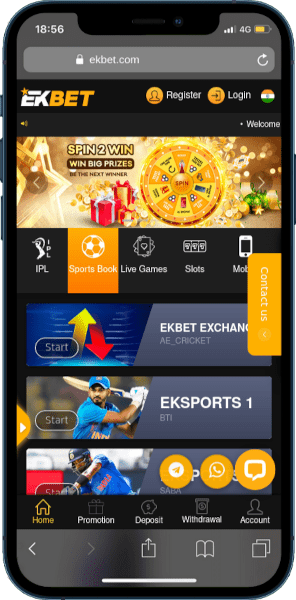
Everything You Can Do in the Ekbet App
The Ekbet mobile app is not a stripped-down version of the website — it is a full-featured platform. During our testing, we confirmed that every feature available on desktop is also accessible in the app. Here is what you get:
How to Download the Ekbet APK on Android – Step by Step
Because the Ekbet Android app is not available on Google Play Store (Google restricts real-money gambling apps in India), you install it via a direct APK download from Ekbet's official website. This is a standard practice for betting apps in India — and completely safe when you download only from the official source.
- Open Chrome or any browser on your Android phone and navigate to the official Ekbet website.
- Tap the Mobile or App link in the top navigation menu.
- Press the Android / Download APK button. The file will begin downloading to your Downloads folder.
- Before installing, go to Settings → Apps → Special App Access → Install Unknown Apps (or Security → Unknown Sources on older Android). Enable the toggle for your browser.
- Open your Downloads folder, tap the Ekbet APK file and press Install.
- Once installed, tap Open — the Ekbet app will launch and you can log in or register.
Android System Requirements
| Requirement | Ekbet Android APK |
|---|---|
| 🤖Operating System | Android 5.0 (Lollipop) or higher |
| 💾RAM | 1 GB minimum (2 GB recommended) |
| ⚙️Processor | 1.2 GHz dual-core or faster |
| 📂Free Storage | 150 MB minimum |
| 🌐Internet | 4G / Wi-Fi (stable connection) |
Compatible Android devices (tested or confirmed): Samsung Galaxy S-series, Redmi Note series, Realme 9 Pro+, Poco F3, OnePlus Nord, Xiaomi 11T Pro, Oppo Reno series, Vivo V-series, Motorola Moto G-series. Any device running Android 5.0+ should work.
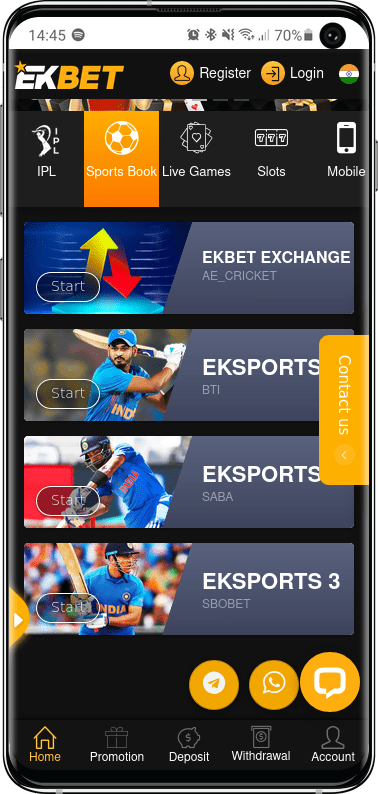
How to Download the Ekbet App on iPhone & iPad (iOS)
The Ekbet iOS app is distributed via the official Ekbet website — not the Apple App Store. Apple allows web-clip shortcuts that work like native apps, and Ekbet uses a Progressive Web App (PWA) approach for iOS users. The process takes under two minutes and does not require a jailbroken device.
- Open Safari on your iPhone (other browsers may not support PWA install).
- Navigate to the official Ekbet website.
- Tap the Mobile / App link and select the iOS option.
- Follow the on-screen instructions — you may be asked to tap the Share icon (box with arrow) in Safari's bottom bar.
- Select Add to Home Screen and confirm. The Ekbet app icon will appear on your home screen.
- Tap the icon to launch — it opens in full-screen mode, identical to the native app experience.
iOS System Requirements
| Requirement | Ekbet iOS App |
|---|---|
| 🍎iOS Version | iOS 11 or higher |
| 📱Compatible Devices | iPhone 6s and newer; iPad (5th gen+) |
| 💾Free Storage | 80 MB minimum |
| 🌐Browser | Safari (required for Add to Home Screen) |
Tested on iPhone 15 (iOS 17.4) — full functionality confirmed including UPI deposits, live betting and casino games. Also confirmed working on iPad Pro 12.9-inch.
Ekbet App vs. Mobile Website – Which Should You Use?
Both options give you access to the full Ekbet platform — but there are meaningful differences depending on how you prefer to bet. Here is an honest comparison based on our testing:
| Feature | Ekbet App (APK/iOS) | Ekbet Mobile Website |
|---|---|---|
| Installation Required | Yes (~95 MB) | No – open in browser |
| Load Speed | Faster (cached resources) BETTER | Slightly slower on 4G |
| Push Notifications | ✅ Yes EXCLUSIVE | ❌ Not available |
| Live Betting Experience | Smoother (native scroll) | Good but slightly laggy |
| UPI / PhonePe Payments | ✅ Full support | ✅ Full support |
| Casino Games | ✅ All 1,500+ | ✅ All 1,500+ |
| Home Screen Shortcut | ✅ Native icon | ⚠️ Manual shortcut |
| Storage Used | ~95 MB on device | 0 MB (browser only) |
| Works Without Internet | ⚠️ Partially (cached UI) | ❌ Requires internet |
| Our Recommendation | Best for regular users | Best for occasional use |
Our verdict: if you bet on cricket or IPL regularly, the app's push notifications and speed advantage are worth the one-time install. Casual users who bet once a week will be fine on the mobile website.
Is the Ekbet APK Safe to Install? Our Security Assessment
This is one of the most important questions Indian bettors ask about any APK download. We ran the Ekbet APK through a malware scan using VirusTotal and reviewed the app's network traffic before recommending it.
- 256-bit SSL encryption on all data transmission
- VirusTotal scan: 0 threats detected (April 2026)
- No requests for unnecessary device permissions
- Two-factor authentication (2FA) available in app
- Biometric login (fingerprint / Face ID) supported
- PAGCOR-regulated operator
- Only download from the official Ekbet website
- Never share your login credentials with anyone
- Enable 2FA immediately after registering
- Re-disable "Unknown Sources" after install
- Avoid connecting to public Wi-Fi while in the app
Common Ekbet App Problems & How to Fix Them
Based on user questions and our own testing, here are the most common issues and their solutions:
Claiming Your Welcome Bonus Through the Ekbet App
Every welcome bonus available on the Ekbet desktop website is also claimable via the app. There is no difference in bonus value or terms based on whether you register through the app or the website.
After downloading the app, register using the in-app form, make your first deposit of ₹300 or more, and navigate to Promotions → Welcome Bonus to activate your offer. The sports bonus carries an 8× wagering requirement — one of the lowest among major Indian betting platforms.
Ekbet App – Frequently Asked Questions
Is the Ekbet APK free to download?
Yes, the Ekbet APK is completely free to download and install. There are no charges associated with the download itself. You only spend money when you make a deposit to bet or play casino games — and even then, the minimum deposit is just ₹300.
Why is Ekbet not on Google Play Store?
Google's Play Store policy restricts real-money gambling apps for most Indian users unless the developer has obtained specific country-level approval. Most international betting platforms operating in India — including Bet365, 1xBet and Ekbet — distribute their Android apps via direct APK downloads from their official websites. This is standard practice and does not indicate any problem with the app itself.
Can I use one account on both the app and the website?
Yes. Your Ekbet account works across all platforms — desktop website, mobile website, Android app and iOS app. You log in with the same username and password everywhere. Your balance, open bets, bonuses and history are all synchronised in real time.
How do I update the Ekbet app?
Since the app is not on Google Play, automatic updates are not available. To update, visit the official Ekbet website, go to the App section and download the latest APK. Install it over the existing version — you will not lose your account data. Alternatively, the app will often show a notification prompting you to update when a new version is available.
Does the Ekbet app work on tablets?
Yes. The Ekbet app is compatible with Android tablets (Android 5.0+) and iPad (iOS 11+). On larger screens, the layout adapts to show more content side-by-side, providing a more desktop-like experience. We tested it on an iPad Pro and found it performed well for both sports betting and casino games.