Who Can Register at Ekbet India?
Before creating your account, check that you meet the following requirements. Ekbet enforces these conditions to comply with its PAGCOR operating licence and responsible gambling obligations. Accounts found to be in violation may be suspended without notice.
- At least 18 years of age
- A resident of India or accessing from a permitted jurisdiction
- Registering for yourself — no proxy accounts
- Providing genuine personal information
- Not a current Ekbet employee or immediate family member
- You already have an active Ekbet account
- You are under 18 years of age
- You are self-excluded from Ekbet or related platforms
- You are accessing from a prohibited jurisdiction
What Information You Need to Register
The Ekbet registration form takes less than two minutes to complete. Have the following ready before you start — it will make the process faster and reduce the chance of errors:
How to Register at Ekbet India – 6 Steps
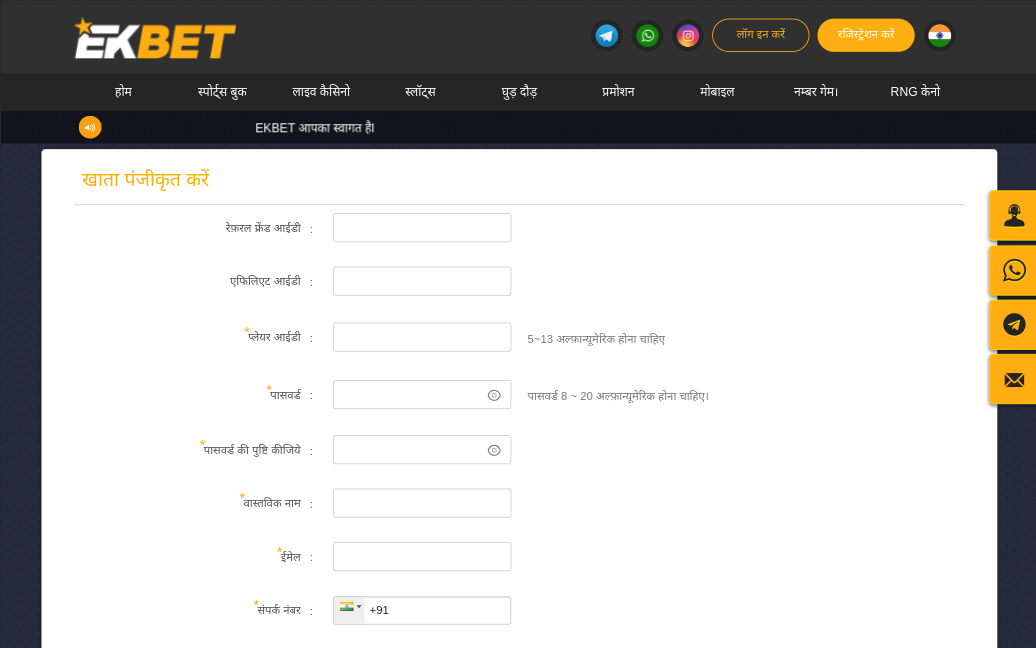
Follow these steps exactly. The process should take under two minutes on desktop or mobile. Screenshots are taken from the live Ekbet website as of April 2026.
- Go to the official Ekbet India website. Look for the Register or Join Now button — it appears in the top navigation bar on both desktop and mobile.
- The registration form opens. Enter your full name, email address and mobile number in the first section.
- Enter your date of birth (DD/MM/YYYY format) and select INR as your account currency.
- Create a secure password. It must be at least 8 characters and include one uppercase letter, one number and one special character.
- Read the Terms and Conditions and tick the checkbox to confirm you are 18+ and agree to the rules. Optionally, subscribe to promotional emails.
- Click Join Now. Your account is created instantly. A confirmation email is sent to your inbox — click the verification link to activate it.
Identity Verification (KYC) at Ekbet – What to Expect
KYC (Know Your Customer) verification is not required to register or place bets at Ekbet — but it is mandatory before you can make your first withdrawal. This is a legal requirement for all regulated betting operators, not specific to Ekbet.
Think of it this way: registering is like opening a bank account online, but KYC is the in-person identity check that unlocks full account access including withdrawals.
Documents Accepted for KYC
| Document Type | Purpose | Format |
|---|---|---|
| Aadhaar Card | Identity & age verification | JPEG, PNG or PDF |
| PAN Card | Identity verification | JPEG, PNG or PDF |
| Passport | Identity & age verification | JPEG, PNG or PDF |
| Driving Licence | Identity & age verification | JPEG, PNG or PDF |
| UPI Screenshot / Bank Statement | Proof of payment method | JPEG or PDF |
How to Submit KYC Documents
- Log in to your Ekbet account and go to Account Settings → Verification.
- Upload a clear photograph or scan of your chosen photo ID (Aadhaar, PAN, Passport or Driving Licence).
- Upload a screenshot of your UPI / payment method to confirm your payment details match your name.
- Click Submit. Ekbet's compliance team will review your documents.
- Verification typically completes within a few minutes to 24 hours. You will receive an email confirmation once approved.
Making Your First Deposit After Registration
Once your account is created, you can make a deposit immediately — KYC verification is not required at this stage. Deposits at Ekbet are processed almost instantly via all supported methods.
| Payment Method | Min. Deposit | Processing Time | Fees |
|---|---|---|---|
| UPI (BHIM, GPay, PhonePe) | ₹300 | Under 30 seconds | None |
| Google Pay | ₹300 | Under 30 seconds | None |
| PhonePe | ₹300 | Under 30 seconds | None |
| Bank Transfer (NEFT/IMPS) | ₹500 | 10 minutes – 2 hours | None |
| Visa / Mastercard | ₹500 | 1–5 minutes | Possible card fee |
| Neteller | ₹500 | 1–3 minutes | None |
Securing Your Ekbet Account After Registration
Creating a strong account is about more than just a password. Here are the essential security steps we recommend completing within the first 24 hours of registration:
Common Registration Mistakes and How to Avoid Them
Based on user support queries, these are the most frequent registration errors — and the simple fixes:
| Problem | Likely Cause | Fix |
|---|---|---|
| "Email already registered" | You already have an account or mistyped your email | Try logging in instead; use Forgot Password if needed |
| Verification email not received | Email in spam folder or email typo | Check spam/junk; contact support to resend if email was correct |
| Password not accepted | Does not meet strength requirements | Use 8+ characters with uppercase, number and special character |
| Phone number not accepted | Wrong format — add +91 country code | Enter as +91XXXXXXXXXX or just 10-digit number without prefix |
| KYC rejected | Blurry photo, name mismatch or expired document | Re-submit a clear, well-lit photo; ensure name matches registration |
| Bonus not credited after deposit | Bonus not activated before depositing | Contact live chat — they can often apply the bonus retroactively within 24 hours |
Ekbet Registration – FAQ
Can I register at Ekbet without uploading documents?
Yes — you can register and place bets without uploading any documents. Document verification (KYC) is only required when you make your first withdrawal request. At that point, you will need to submit a valid government-issued photo ID and proof of payment method before the withdrawal is processed.
How long does Ekbet account verification take?
Account registration is instant — your account is created the moment you submit the form. KYC document verification typically takes between a few minutes and 24 hours. Our reviewer's documents were verified within 3 hours (submitted on a weekday morning). If verification takes longer, contact the 24/7 live chat for an update.
Is my personal data safe with Ekbet?
Yes. Ekbet uses 256-bit SSL encryption for all data transmission. Your personal information is stored on secure, encrypted servers and is never sold or shared with third parties for marketing purposes. Ekbet's data handling practices comply with its PAGCOR regulatory obligations. Full details are available in the Privacy Policy.
Can I register on the Ekbet app instead of the website?
Yes. The Ekbet app includes the full registration form. Download the Android APK or iOS app (see our App Guide), launch the app and tap Register. The form is identical to the website version and your account will work seamlessly across both platforms.
What if I enter the wrong information during registration?
Minor details like your phone number or email can often be updated in Account Settings. However, your legal name and date of birth must match your KYC documents — these cannot be edited after account creation. If you entered an incorrect name or birth date, contact Ekbet's live chat support immediately; they may be able to correct it before KYC is submitted.